Why I built it
Some games do not need photorealistic graphics, a 100 GB download, or a season pass to be memorable. Sometimes a tiny .swf file is enough to bring back an entire afternoon.
I recently rediscovered a folder of the Flash games I played as a child: Fancy Pants Adventures, Shopping Cart Hero 2, Fireboy & Watergirl, Tetris, Tobby in Danger, and dozens of smaller arcade and educational games. Modern browsers no longer run Adobe Flash, but I did not want the collection to remain an inert archive.
I wanted the folder to feel like a personal arcade. That led to a short list of requirements:
- one page for browsing and searching the collection;
- browser-based play with a quick return to the library;
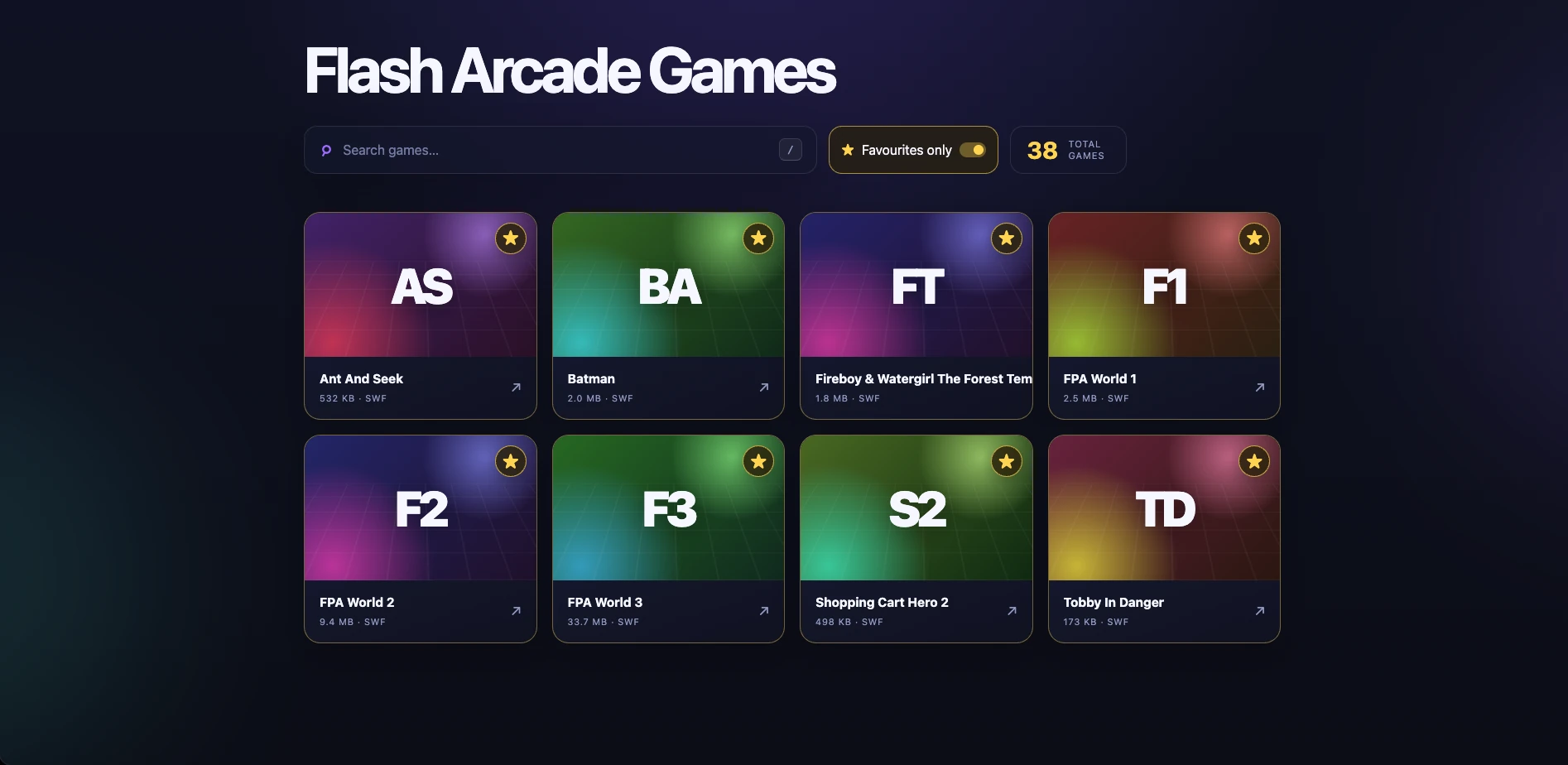
- favourites and a favourites-only filter;
- automatic discovery when I copy in another SWF;
- no database or manifest to maintain;
- isolation from the Club Penguin server already running on the VM.
This article explains the complete build, the design choices behind it, and the compatibility problems I solved along the way.
Only host games and artwork that you own or have permission to distribute. My arcade is a private preservation project on my home network.
What I built
The result is a dedicated Docker Compose stack named flash-arcade. It runs alongside the existing Club Penguin containers without modifying them.
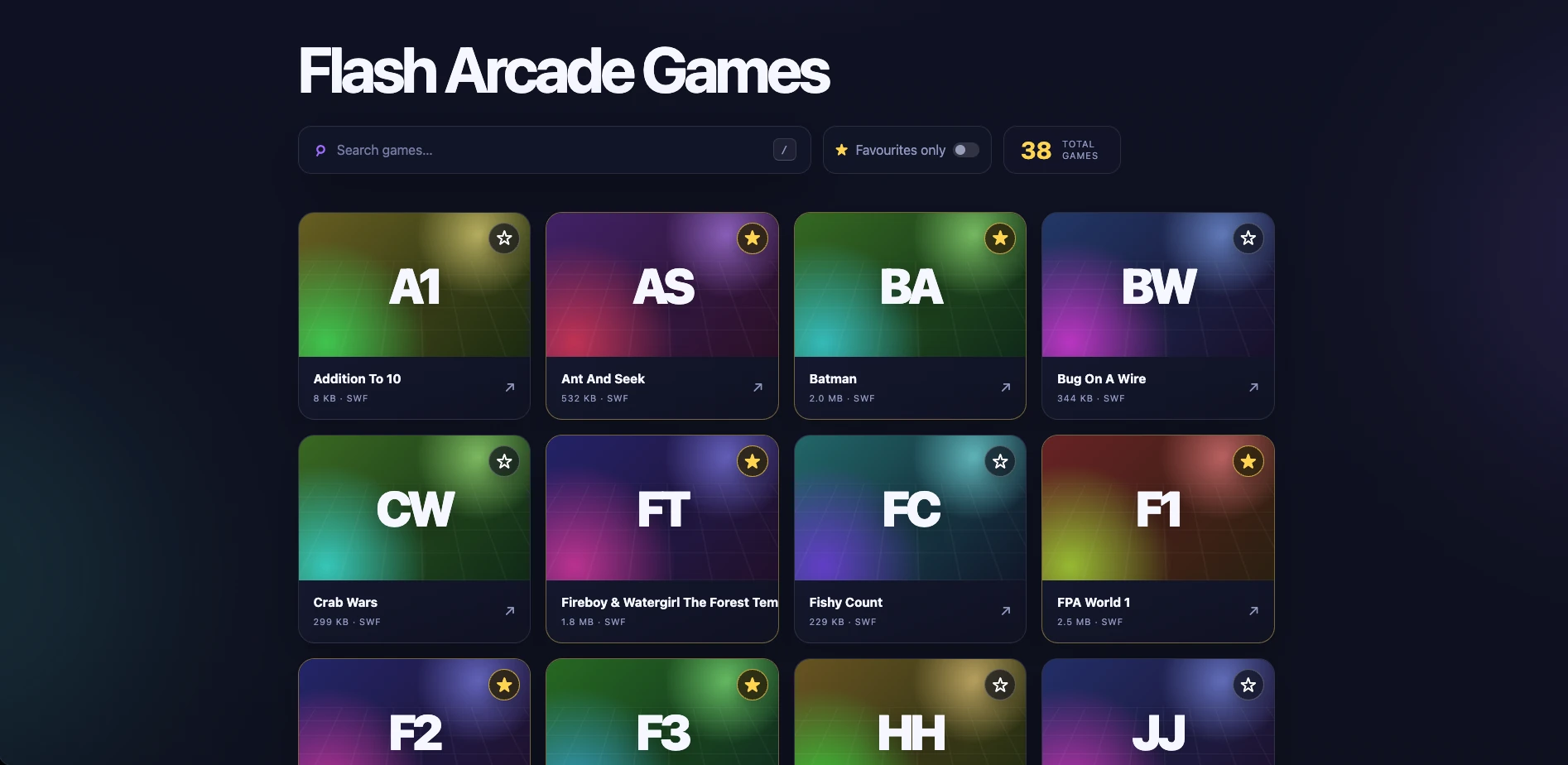
The library currently contains 38 games. The homepage displays:
- the title Flash Arcade Games;
- a search bar;
- a total-game counter;
- automatically generated game cards;
- a star on every card;
- a Favourites only toggle.
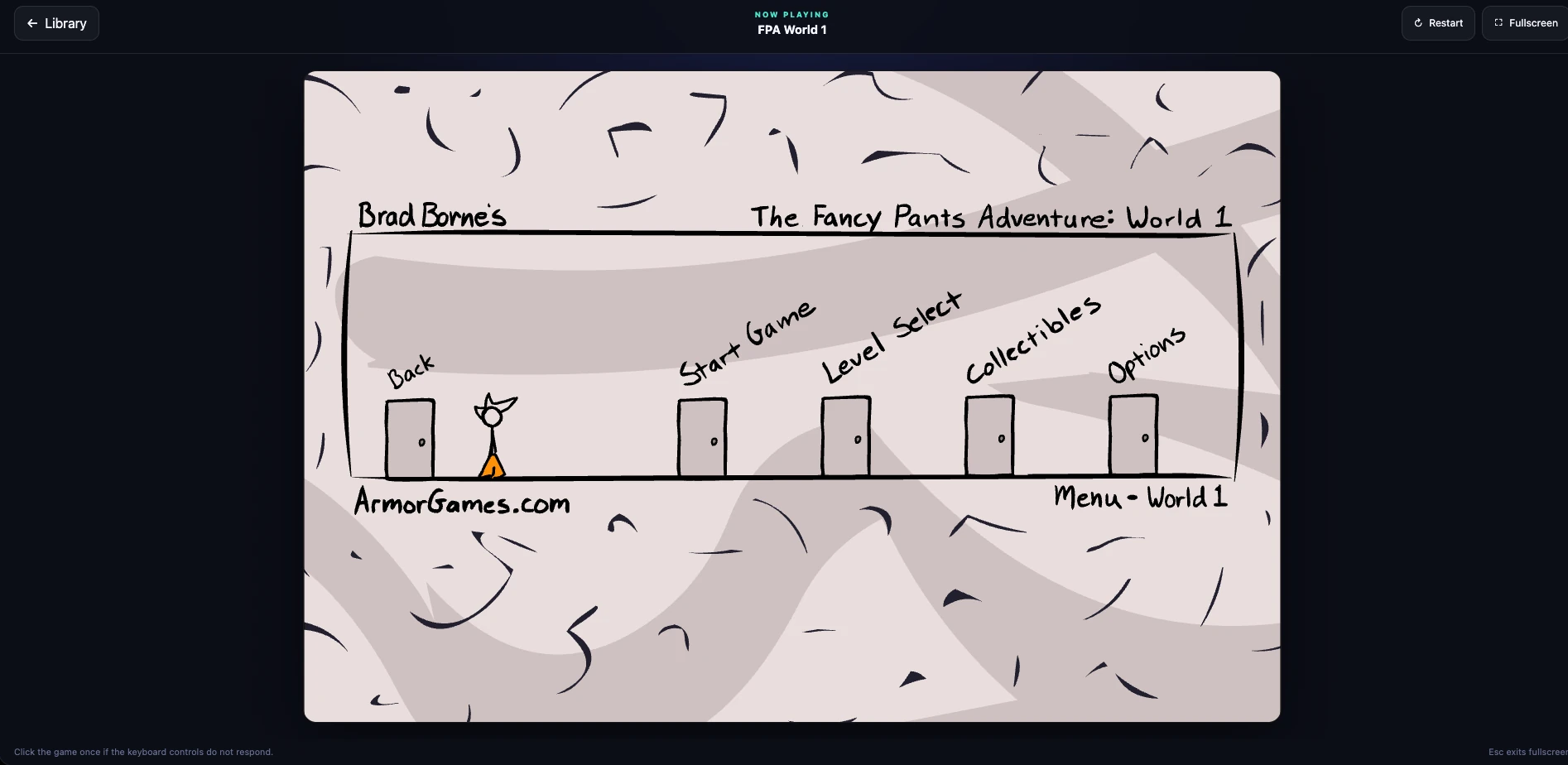
Selecting a card opens a dedicated player with Library, Restart, and Fullscreen controls. A self-hosted copy of Ruffle runs each SWF, so the browser never needs the obsolete Adobe Flash plug-in.
Best of all, adding a game requires only copying a file into one folder and refreshing the page:
~/flash-arcade/games/new_game.swfThere is no rebuild, restart, database migration, or metadata file to update.
Why it shares a VM
I initially considered creating a separate virtual machine. That would provide the strongest boundary, but it would also add another operating system to patch, another Docker installation, another backup target, and more reserved memory.
The existing Ubuntu VM had enough free memory and disk space, and a static arcade is an extremely small workload. I therefore chose process-level isolation instead:
- a separate Compose project;
- a separate container;
- a separate port;
- separate site, emulator, and game mounts;
- strict CPU, memory, and process limits;
- no dependency on the Club Penguin database, Redis instance, or web server.
After deployment, the arcade container used roughly 3.5 MiB of memory while idle and essentially no CPU. A second VM would have added far more overhead than the application itself.
The architecture looks like this:
Browser
   |
   | HTTP :8080
   v
+---------------------------+
| flash-arcade-web           |
| Nginx + static HTML/JS/CSS |
|                           |
| /api/games/ -> JSON list  |
| /games/     -> SWF files  |
| /ruffle/    -> JS + WASM  |
+-------------+-------------+
              |
              | read-only bind mounts
              v
   ~/flash-arcade/
   ├── site/
   ├── games/
   ├── ruffle/
   └── nginx/

Existing Club Penguin containers continue using port 80.
Why the games use a bind mount
Docker named volumes work well for application-managed data, but Docker deliberately hides their storage details. I wanted the opposite: a normal, obvious folder where I could add a game with scp, SFTP, Finder, or a file share.
I therefore used a dedicated bind mount:
- ./games:/usr/share/nginx/html/games:roThe directory persists independently of the container while remaining easy to manage from the host. It is mounted read-only inside the container, so a compromised web process cannot overwrite the collection. Docker documents the host-to-container behavior and the ro option in its bind mount documentation.
Prerequisites
My environment was:
- Ubuntu 24.04 VM;
- Docker Engine with the Compose plug-in;
- a non-root account that can run Docker;
- a LAN address assigned to the VM;
- legally obtained SWF files.
The same design should work on most current Linux distributions. Install Docker using the official Docker instructions rather than an unmaintained third-party script.
In the examples below, replace 192.168.1.150 with the LAN address of your own VM. Also check your account’s numeric UID and GID:
id -u
id -g
Mine were both 1000, which is reflected in the Compose file.
1. Create the project structure
I kept the entire stack under the VM account’s home directory:
mkdir -p ~/flash-arcade/nginx
mkdir -p ~/flash-arcade/site/assets
mkdir -p ~/flash-arcade/site/games
mkdir -p ~/flash-arcade/site/ruffle
mkdir -p ~/flash-arcade/games
mkdir -p ~/flash-arcade/ruffle
mkdir -p ~/flash-arcade/backups
cd ~/flash-arcade
The apparently redundant site/games and site/ruffle directories matter. The entire site directory is mounted read-only, and Docker then mounts games and ruffle at nested paths inside it. Pre-creating those mount points avoids a startup failure when the container’s root filesystem is also read-only.
The final layout is:
flash-arcade/
├── compose.yaml
├── SHA256SUMS
├── backups/
├── games/
│   ├── FPAWorld1.swf
│   ├── FPAWorld2.swf
│   ├── FPAWorld3.swf
│   └── ...
├── nginx/
│   └── default.conf
├── ruffle/
│   ├── ruffle.js
│   ├── *.wasm
│   └── ...
└── site/
    ├── index.html
    ├── player.html
    ├── assets/
    │   ├── app.js
    │   ├── player.js
    │   └── styles.css
    ├── games/
    └── ruffle/
2. Install Ruffle locally
Ruffle is an open-source Flash Player emulator written in Rust and compiled to WebAssembly for browsers. Its official downloads page provides a package specifically intended for self-hosting. The web API also supports creating a player and loading a SWF programmatically, as shown in the project’s web core documentation.
I pinned the stable self-hosted release used during this project, version 0.6.0:
ruffle_tmp_dir="$(mktemp -d)"
curl -fL \
  https://github.com/ruffle-rs/ruffle/releases/download/v0.6.0/ruffle-0.6.0-web-selfhosted.zip \
  -o "$ruffle_tmp_dir/ruffle.zip"
unzip -q "$ruffle_tmp_dir/ruffle.zip" -d ~/flash-arcade/ruffle
Pinning a release made the deployment reproducible. It also prevented the arcade from changing unexpectedly because of an automatic CDN update. I can test and install newer Ruffle releases later on my own schedule.
3. Create the Docker Compose stack
This is the Compose configuration used by the project:
name: flash-arcade

services:
  web:
    image: nginx@sha256:dc5069ad14f19660b141b21236140b91656bf89bbc3e2417c70ae650cd66104c
    container_name: flash-arcade-web

    # Replace these numbers if `id -u` and `id -g` return something else.
    user: "1000:1000"

    restart: unless-stopped
    read_only: true

    tmpfs:
      - /var/cache/nginx:uid=1000,gid=1000,mode=0700
      - /var/run:uid=1000,gid=1000,mode=0700
      - /tmp:uid=1000,gid=1000,mode=1777

    ports:
      # Replace this with the VM's LAN IP.
      - "192.168.1.150:8080:8080"

    volumes:
      - ./site:/usr/share/nginx/html:ro
      - ./ruffle:/usr/share/nginx/html/ruffle:ro
      - ./games:/usr/share/nginx/html/games:ro
      - ./nginx/default.conf:/etc/nginx/conf.d/default.conf:ro

    healthcheck:
      test: ["CMD-SHELL", "wget -qO- http://127.0.0.1:8080/healthz | grep -q '^ok$'"]
      interval: 30s
      timeout: 5s
      retries: 3
      start_period: 10s

    security_opt:
      - no-new-privileges:true

    mem_limit: 256m
    cpus: 0.50
    pids_limit: 100
A few details are worth calling out:
- The Nginx image is pinned by digest rather than a moving tag.
- The container cannot gain new privileges.
- Its root filesystem is read-only.
- The writable Nginx runtime paths are small in-memory filesystems.
- Site files, Ruffle, and games are all read-only mounts.
- The service is capped at half a CPU, 256 MiB of memory, and 100 processes.
- The port is bound to one LAN address rather than every interface.
- The health check tests the service from inside the container.
4. Make Nginx generate the catalogue
I did not want a backend process or database just to list files. Nginx already has the missing primitive: its autoindex module can emit a directory listing as JSON. The behavior is documented in the official ngx_http_autoindex_module reference.
This became the entire catalogue API:
location /api/games/ {
    alias /usr/share/nginx/html/games/;
    autoindex on;
    autoindex_format json;
    autoindex_exact_size on;
    add_header Cache-Control "no-store" always;
}
The complete Nginx configuration is:
server {
    listen 8080;
    listen [::]:8080;
    server_name _;

    root /usr/share/nginx/html;
    index index.html;
    charset utf-8;

    server_tokens off;
    client_max_body_size 1m;

    add_header X-Content-Type-Options "nosniff" always;
    add_header Referrer-Policy "same-origin" always;
    add_header X-Frame-Options "SAMEORIGIN" always;

    location = /healthz {
        default_type text/plain;
        return 200 "ok\n";
    }

    location = /api/games {
        return 308 /api/games/;
    }

    location /api/games/ {
        alias /usr/share/nginx/html/games/;
        autoindex on;
        autoindex_format json;
        autoindex_exact_size on;
        add_header Cache-Control "no-store" always;
    }

    location /games/ {
        alias /usr/share/nginx/html/games/;
        autoindex off;
        types {
            application/x-shockwave-flash swf;
            image/png png;
            image/jpeg jpg jpeg;
            image/webp webp;
        }
        default_type application/octet-stream;
        add_header Cache-Control "no-cache, must-revalidate" always;
    }

    location /ruffle/ {
        types {
            application/wasm wasm;
            application/javascript js mjs;
        }
        try_files $uri =404;
        add_header Cache-Control "public, max-age=604800" always;
    }

    location /assets/ {
        try_files $uri =404;
        add_header Cache-Control "no-cache, must-revalidate" always;
    }

    location = / {
        try_files /index.html =404;
        add_header Cache-Control "no-store" always;
    }

    location = /index.html {
        add_header Cache-Control "no-store" always;
    }

    location = /player.html {
        add_header Cache-Control "no-store" always;
    }

    location / {
        try_files $uri $uri/ =404;
    }

    location ~ /\. {
        deny all;
    }
}
The API response contains each file’s name, type, modification time, and size. The browser filters that response to .swf files.
This design also explains the caching rules:
- catalogue and HTML responses are not cached;
- UI assets are revalidated;
- Ruffle’s versioned JavaScript and WebAssembly can be cached for a week;
- SWFs are revalidated so replacing a file with the same name takes effect.
5. Build the library UI
The frontend is plain HTML, CSS, and JavaScript. There is no framework and no build step.
On startup, the library requests /api/games/:
const response = await fetch("/api/games/", { cache: "no-store" });
const entries = await response.json();

const games = entries
  .filter((entry) => (
    entry.type === "file"
    && entry.name.toLowerCase().endsWith(".swf")
  ))
  .map((entry) => ({
    filename: entry.name,
    title: displayName(entry.name),
    size: Number(entry.size),
    mtime: entry.mtime || "",
  }));
Deriving the title
The title comes from the filename. The formatter handles underscores, hyphens, camel case, and numbers:
function displayName(filename) {
  return filename
    .replace(/\.swf$/i, "")
    .replace(/[_-]+/g, " ")
    .replace(/([A-Z]+)([A-Z][a-z])/g, "$1 $2")
    .replace(/([a-z])([A-Z])/g, "$1 $2")
    .replace(/([A-Za-z])(\d+)/g, "$1 $2")
    .replace(/(\d+)([A-Za-z])/g, "$1 $2")
    .replace(/\s+/g, " ")
    .trim();
}
Examples:
| Filename | Display title |
|---|---|
shopping-cart-hero-2.swf |
Shopping Cart Hero 2 |
FPAWorld3.swf |
FPA World 3 |
tobby_in_danger.swf |
Tobby In Danger |
Generating the tile
Each game also receives a deterministic color palette and initials derived from its filename. The same filename therefore keeps the same appearance after every reload without storing anything.
If I want real artwork, I place an image beside the SWF using the same basename:
games/
├── shopping-cart-hero-2.swf
└── shopping-cart-hero-2.webp
The library recognizes PNG, JPG, JPEG, and WebP thumbnails.
Searching
Search is entirely client-side:
const visibleGames = games.filter((game) => (
  game.title.toLowerCase().includes(query.toLowerCase())
));
Pressing / focuses the search box, which is a small convenience I appreciate in keyboard-driven interfaces.
6. Create the Ruffle player
The player page accepts the selected filename as a query parameter:
/player.html?game=FPAWorld2.swfBefore loading anything, it checks that:
- a filename was supplied;
- it contains no slash or backslash;
- an exact matching SWF exists in the live catalogue.
That prevents the parameter from becoming an arbitrary filesystem path.
The core Ruffle setup is small:
const ruffle = window.RufflePlayer.newest();
const player = ruffle.createPlayer();

container.appendChild(player);

await player.ruffle().load({
  url: gameUrl,
  autoplay: "on",
  unmuteOverlay: "visible",
  quality: "high",
  scale: "showAll",
  letterbox: "on",
  allowFullscreen: true,
  allowNetworking: "internal",
  warnOnUnsupportedContent: true,
  showSwfDownload: false,
});
allowNetworking: "internal" is intentional. These games are expected to be self-contained; they should not need unrestricted outbound access to long-dead advertising, tracking, or asset servers.
The SWF URL includes its modification time and size:
const version = encodeURIComponent(`${game.mtime}-${game.size}`);
const gameUrl = `/games/${encodeURIComponent(game.filename)}?v=${version}`;
This prevents an older copy from remaining stuck in the browser cache after a same-name replacement.
7. Preserve each game’s aspect ratio
My first player filled all available width and height. That looked reasonable until I opened Fancy Pants World 2. Its native stage is 720×480, or 3:2, but the browser window was much wider. The game changed its own Flash scale mode and cropped the top and bottom of the menu.
Setting Ruffle to showAll was not sufficient for every legacy movie because a SWF can change its own stage behavior. The reliable solution was to give the Ruffle element a container that already matches the SWF’s native ratio.
I did not want a hard-coded table of game dimensions, so the player reads the RECT structure at the start of each SWF header. Coordinates are stored in twips, where 20 twips equal one pixel.
Uncompressed files start with FWS. Zlib-compressed files start with CWS, so modern browsers can decode their header using DecompressionStream:
async function readNativeStage(url) {
  const response = await fetch(url, { cache: "no-cache" });
  const file = new Uint8Array(await response.arrayBuffer());
  const signature = String.fromCharCode(...file.subarray(0, 3));

  let movie;
  if (signature === "FWS") {
    movie = file.subarray(8);
  } else if (signature === "CWS") {
    const compressed = new Blob([file.subarray(8)]).stream();
    const decompressed = compressed.pipeThrough(
      new DecompressionStream("deflate")
    );
    movie = new Uint8Array(
      await new Response(decompressed).arrayBuffer()
    );
  } else {
    throw new Error(`Unsupported SWF compression: ${signature}`);
  }

  const cursor = { offset: 0 };
  const coordinateBits = readBits(movie, cursor, 5);
  const xMin = readBits(movie, cursor, coordinateBits, true);
  const xMax = readBits(movie, cursor, coordinateBits, true);
  const yMin = readBits(movie, cursor, coordinateBits, true);
  const yMax = readBits(movie, cursor, coordinateBits, true);

  return {
    width: (xMax - xMin) / 20,
    height: (yMax - yMin) / 20,
  };
}
A ResizeObserver then fits that ratio into the available area:
function fitPlayerToStage() {
  const availableWidth = stageWrap.clientWidth - horizontalPadding;
  const availableHeight = stageWrap.clientHeight - verticalPadding;
  const ratio = nativeStage.width / nativeStage.height;

  let width = availableWidth;
  let height = width / ratio;

  if (height > availableHeight) {
    height = availableHeight;
    width = height * ratio;
  }

  container.style.width = `${Math.floor(width)}px`;
  container.style.height = `${Math.floor(height)}px`;
}
The result is deliberate letterboxing rather than distortion or missing content:
- Fancy Pants uses 3:2;
- Tobby in Danger and Fireboy & Watergirl use 4:3;
- Shopping Cart Hero 2 uses 550×400, or 11:8.
If a future file uses an unsupported compression format, the player falls back to 4:3 rather than refusing to start.
8. Add favourites without a backend
The star on each card stores the SWF filename in localStorage:
const FAVOURITES_KEY = "flash-arcade:favourites:v1";

function loadFavourites() {
  try {
    const saved = JSON.parse(
      localStorage.getItem(FAVOURITES_KEY) || "[]"
    );
    return new Set(Array.isArray(saved) ? saved : []);
  } catch {
    return new Set();
  }
}

function saveFavourites(favourites) {
  localStorage.setItem(
    FAVOURITES_KEY,
    JSON.stringify([...favourites])
  );
}
The Favourites only button is an accessible toggle using aria-pressed. The filter combines naturally with search:
const visibleGames = games.filter((game) => (
  game.title.toLowerCase().includes(query)
  && (!favouritesOnly || favourites.has(game.filename))
));
This keeps the server completely stateless. The trade-off is that favourites belong to one browser and one origin; they do not automatically sync across devices. A small server-side profile system could add that later, but it would be unnecessary complexity for my current use.
9. Copy in the games
From another computer, a game can be uploaded directly into the mounted folder:
scp "path/to/my_game.swf" \
  your-user@192.168.1.150:~/flash-arcade/games/
I copied 38 SWFs and recorded an integrity inventory:
cd ~/flash-arcade
find games -maxdepth 1 -type f -iname '*.swf' -print0 \
  | sort -z \
  | xargs -0 sha256sum > SHA256SUMS
That file gives me a simple way to detect accidental corruption later:
sha256sum --check SHA256SUMS10. Start and verify the stack
Before starting it, I validated the resolved Compose configuration:
cd ~/flash-arcade
docker compose config
Then I launched the service:
docker compose up -dUseful checks are:
docker compose ps
docker compose logs --tail=100 web
curl -I http://192.168.1.150:8080/
curl http://192.168.1.150:8080/healthz
curl http://192.168.1.150:8080/api/games/
The library was available at:
http://192.168.1.150:8080/For the final verification I checked:
- all 38 SWFs appeared in the catalogue;
- search reduced the visible cards correctly;
- adding a temporary SWF changed the count from 38 to 39 without a restart;
- removing it changed the count back to 38;
- a favourite survived a page reload;
- the favourites-only toggle combined with search;
- Tetris, Fireboy & Watergirl, Fancy Pants World 3, and Tobby in Danger rendered;
- Library, Restart, and Fullscreen controls worked;
- the arcade returned HTTP 200;
- the existing Club Penguin hostname still returned HTTP 200;
- the arcade container remained healthy with no relevant browser errors.
Problems and fixes
The final design is simple, but getting there exposed a few old-web edge cases.
Nested mounts failed with a read-only root filesystem
The first container start failed because the target directories for the nested games and ruffle mounts did not exist beneath the already mounted, read-only site directory.
The fix was to create these empty directories in the host’s site tree before starting Compose:
site/games/
site/ruffle/
This allowed Docker to attach the nested mounts without trying to create mount points inside an immutable filesystem.
Some SWFs returned HTTP 403
Several childhood files had restrictive permissions such as mode 0700. Nginx’s usual worker account could list the directory but could not read those files.
Rather than running Nginx as root or remembering to change every imported file, I ran the container as the same numeric user and group that own the game folder:
user: "1000:1000"That made files copied by the VM account readable while retaining the read-only mount.
An alternative is to normalize imported files to mode 0644, but matching ownership made the drop-in workflow more forgiving.
A cached 403 survived after permissions were fixed
The server-side permission problem was gone, but one browser still displayed the previous failure. I addressed that at two layers:
- SWF responses use
Cache-Control: no-cache, must-revalidate; - the player appends the file’s modification time and size to its URL.
Now replacing a SWF with the same filename changes its effective request URL.
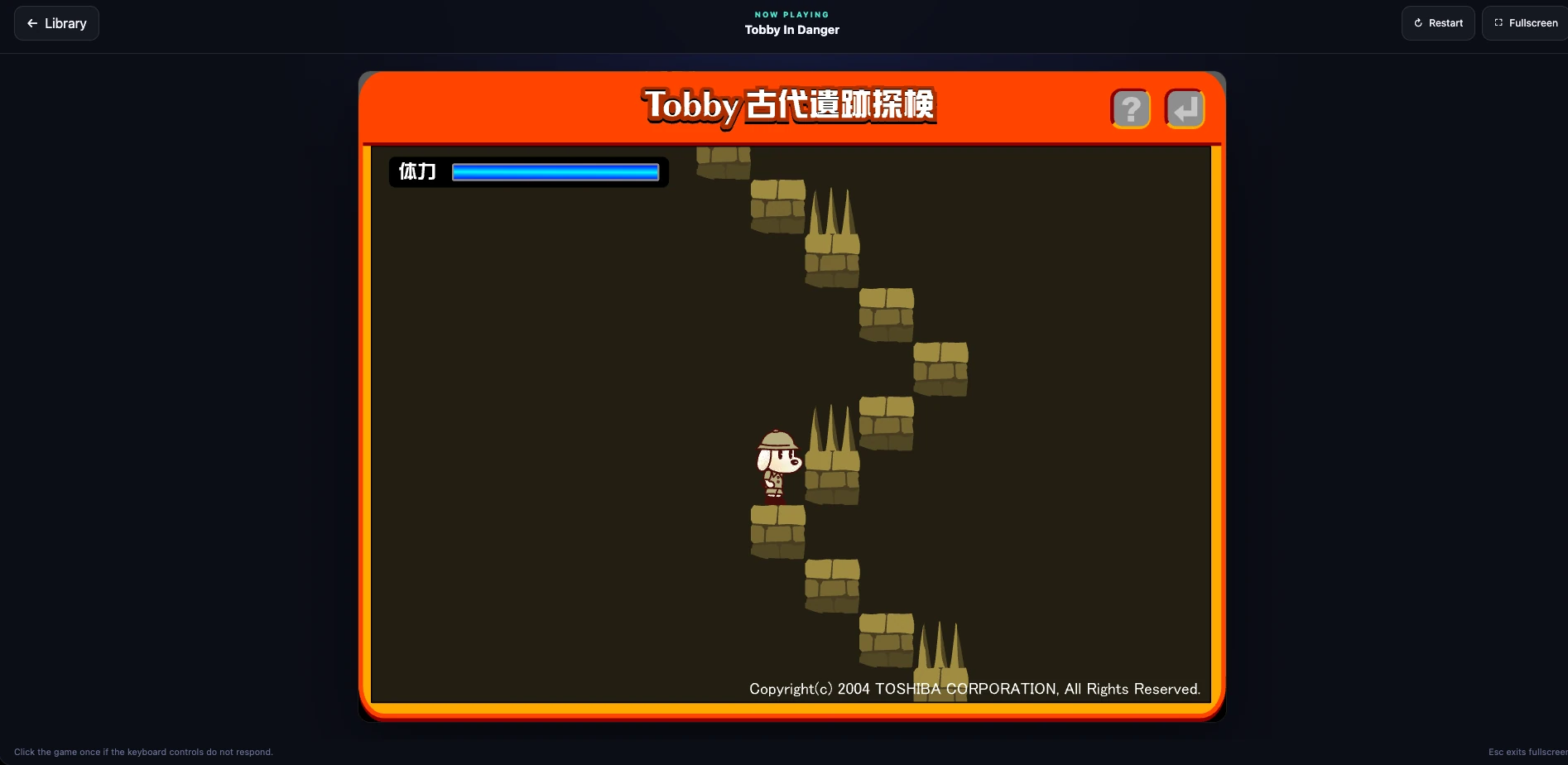
Tobby in Danger claimed Flash was missing
This one looked like a Ruffle failure, but browser diagnostics showed that Ruffle had initialized correctly and downloaded the complete SWF. The Japanese “latest Flash plug-in required” screen was drawn by the game itself.
The file was authored for Flash 6 and contained a fragile ActionScript version check. It effectively read only one character from the old Flash version string. A modern compatible version such as 32 was therefore interpreted as 3, sending the game to its failure frame.
I decompressed the CWS file, located the unique AVM1 action sequence for the version threshold, changed that one comparison value, recompressed the SWF, and tested it under a temporary filename. Only after the title screen rendered did I replace the live copy.
The untouched original remains recoverable at:
~/flash-arcade/backups/tobby_in_danger.original.swfThis patch is specific to that file. Blindly applying binary edits to other games would be unsafe. A scan of the complete collection confirmed that none of the other supplied SWFs contained the same faulty sequence.
Wide screens cropped Fancy Pants
The first player container always filled its grid cell. On a 1920-pixel-wide display, the container’s ratio was much wider than Fancy Pants World 2’s 3:2 stage. The SWF’s own scaling behavior caused content to disappear above and below the visible area.
Parsing the native SWF dimensions and fitting the container to that ratio solved the problem for both normal and expanded views. Empty side space is now intentional letterboxing, not wasted layout.
The homepage was too theatrical
My first design had a logo, status pill, eyebrow text, a huge “Pick a game. Press play.” hero, supporting copy, a second library heading, sorting controls, and a footer.
It looked polished, but it delayed the thing I actually wanted: seeing the games.
I reduced the page to Flash Arcade Games, search, favourites, the total count, and the cards. The simpler interface feels more like a useful appliance and less like a landing page trying to sell itself.
Day-to-day use
Adding a self-contained SWF now consists of one operation:
cp my_new_game.swf ~/flash-arcade/games/After a browser refresh, the UI automatically provides:
- a cleaned-up title;
- a deterministic tile;
- the file size;
- a launch link;
- a favourite button;
- search visibility;
- native aspect-ratio detection when the format is supported.
Optional artwork uses the same basename:
my_new_game.swf
my_new_game.webp
Removing a game is equally simple: move its SWF out of the directory and refresh. The container does not need to restart because Nginx reads the directory for every catalogue request.
Security and exposure
The arcade is currently bound to a LAN address rather than exposed directly to the public internet. That is the safest default for a personal archive.
If I publish it later, I will place it behind an authenticated reverse proxy or an access-control layer rather than forwarding port 8080 from the router. I would also consider:
- HTTPS;
- identity-based access;
- rate limiting;
- a restrictive Content Security Policy tested against Ruffle’s WebAssembly requirements;
- regular Ruffle upgrades after compatibility testing;
- backups of the games and checksum inventory.
The current container already has a useful baseline: read-only mounts, an immutable root filesystem, no new privileges, resource limits, no upload endpoint, disabled directory browsing for /games/, and restricted Ruffle networking.
What I learned
The most satisfying part of this project was not getting one SWF to run. It was turning a pile of unrelated files into a collection that is pleasant to maintain.
Three decisions did most of the work:
- Use Ruffle as a self-hosted runtime. The browser gets a modern WebAssembly application rather than an abandoned plug-in.
- Treat the filesystem as the source of truth. Nginx’s JSON autoindex removes the need for a database, manifest, or administration screen.
- Preserve each SWF’s assumptions where possible. Native dimensions, conservative networking, cache busting, and targeted compatibility patches help old games behave as their authors expected.
There is also a broader lesson in the homepage redesign: preservation software does not need to be ornate. The content is already the point.
What comes next
The current version already meets the original goal, but there are several natural extensions:
- generate real thumbnails from selected SWF frames;
- add tags or collections without losing zero-maintenance discovery;
- sync favourites across devices;
- remember per-game volume and control notes;
- add an authenticated public hostname;
- run an automated compatibility scan after a Ruffle upgrade;
- back up the games directory to separate storage.
For now, though, I can open one page, click Fancy Pants, play for a while, return to the library, and choose something else. The experience is small, private, and uncomplicated—exactly like the games deserved.